Home > Site Announcements & Feedback > Creating a Photo Album and Uploading Pictures
Post Reply  Down to end
Page 1 of 1
Print this entire topic · 
Martin
Site Admin


Member Since: 24 Mar 2007
Location: Warwick
Posts: 635

United Kingdom 2008 Range Rover TDV8 Vogue SE Auto Java Black
Creating a Photo Album and Uploading Pictures

Here's some instructions of how to create your own photo gallery and upload photos to it Smile

  1. First, make sure you are registered and logged in.

  2. Click the "Gallery" link in the top right, under the fullfatrr.com logo


  3. Click "Create/order my albums under the grey menu bar


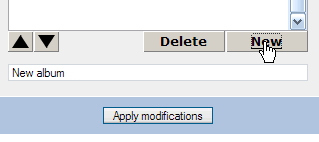
  4. Click the "New" button


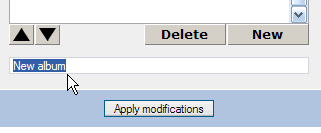
  5. If you want to change the album name, highlight the whole default name


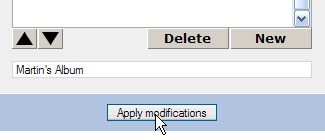
  6. Type in your required gallery name, and press "Apply Modifications"


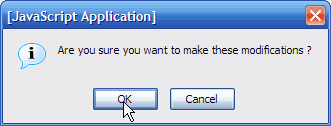
  7. In the messagebox window, press "OK"


  8. Press the "Continue" button.


You will now have an album to fill with photos. You can repeat the steps above to create multiple albums.

Now, to upload photos:

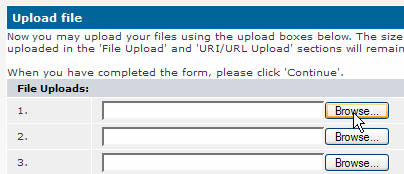
  1. Click "Upload Photos" on the menu bar


  2. Click the top "Browse" button


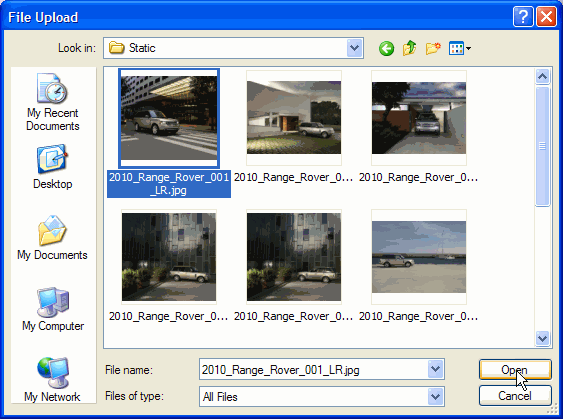
  3. Find the file you want to upload, and press "Open"/"OK".


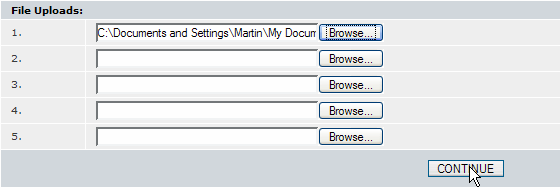
  4. Repeat steps 2 and 3 for each photo you wish to upload, up to a maximum of 5 - if you want to upload more than five photos you should repeat the whole upload procedure until all photos are uploaded.

  5. Click the "Continue" button


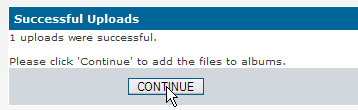
  6. Click the "Continue" button once the uploading to the server completes


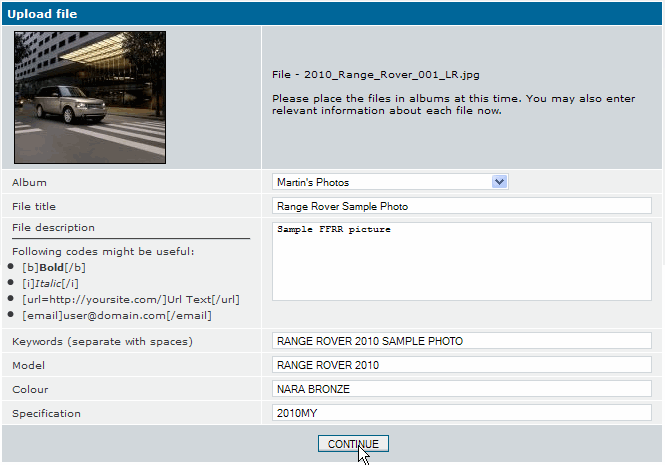
  7. For each photo you'll have a form to fill in. If you have multiple albums, use the Album field to select which album you wish to put each photo in.

    Fill in as much information as you want in the rest of the form, and then click "Continue".


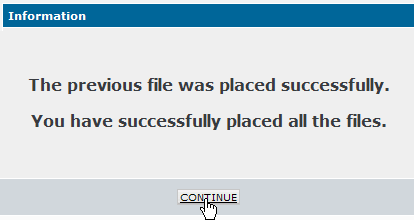
  8. Finally, click "Continue" to finish adding photos to your album.


 FFRR owner by proxy

Post #7405 25th Sep 2009 9:59am
View user's profile Send private message View poster's gallery Send e-mail Reply with quote
Joe90


Member Since: 29 Apr 2010
Location: Winchester
Posts: 778

England 2002 Range Rover Td6 HSE Auto Alveston Red

If I number my uploaded pictures and then when viewing the album click on Title > Sort ascending, will everyone else see it this way? Have "RSW All Comms" in Hampshire - happy to help Smile

Current Combustion Engine Transports:
Range Rover 2002 TD6 HSE Alveston Red, Sand Leather
Audi 2004 Cabriolet Sport 3.0 (Amulet Red)
Mazda Eunos 1990 (Brilliant Red)
MG Midget Mk 1 1962 (undergoing restoration) (to be Nightfire Red)

Post #90501 5th Nov 2011 1:47pm
View user's profile Send private message View poster's gallery Reply with quote
scarey


Member Since: 13 Jul 2010
Location: stan in swindon
Posts: 7067

England 2005 Range Rover Td6 HSE Auto Cairns Blue

not sure joe, martin will tell us. .


scarey say's , '' would members please stop using the "quote" button as a "reply" button ''

Post #90515 5th Nov 2011 3:19pm
View user's profile Send private message View poster's gallery Reply with quote
Martin
Site Admin


Member Since: 24 Mar 2007
Location: Warwick
Posts: 635

United Kingdom 2008 Range Rover TDV8 Vogue SE Auto Java Black

Hi Joe,

Sorry no, the Title +/- doesn't "save" for your album, it's a viewing function. The default sort order is by upload time, I'll look into if this can be changed.

Martin FFRR owner by proxy

Post #91037 8th Nov 2011 4:23pm
View user's profile Send private message View poster's gallery Send e-mail Reply with quote
Post Reply  Back to top
Page 1 of 1
All times are GMT

Jump to  
Previous Topic | Next Topic >
Posting Rules
You cannot post new topics in this forum
You cannot reply to topics in this forum
You cannot edit your posts in this forum
You cannot delete your posts in this forum
You cannot vote in polls in this forum


Powered by phpBB © 2001 phpBB Group. SEO by phpBB SEO
Site Copyright © 2006-2012 Martin Lewis